
How to log in to Wild Card City
Use Visit Wild Card City above to open Joka. If you have used the casino before, choose Login in the top-right corner. The yellow Register button beside it starts a new account.

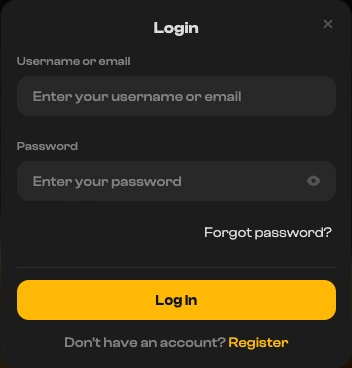
- Enter your username or email. Either works in the first field. If your browser fills it for you, check that it belongs to the account you want to open.
- Enter your password. On a private screen, use the eye icon to check a mistyped character. Password managers can retain an old password after a reset.
- Select Log In. If the details are rejected, check the identifier first. If you no longer know the password, use Forgot password? below the password field.
Looking for VIP login?
The account site has a separate VIP menu item for the rewards programme. Start with the usual Login button. If you need help with an invitation, use Contact Us in the footer and quote the invitation reference. Only the operator can confirm the tier attached to your account.
Reset a forgotten password
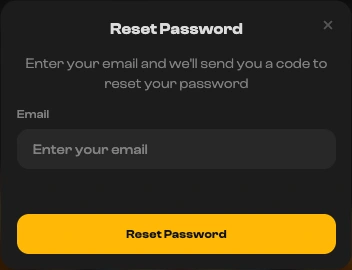
From the Login window, choose Forgot password?. The next window asks for one detail: the email address you used for the account.
- Type that address in Email and choose Reset Password once.
- Open the reset message from Joka. If you are on a phone, leave the casino tab open while you check your email.
- Follow the instructions for the emailed code. Once the password is changed, return to Login and update the saved password on your own device.
If you cannot get back in
- Your saved password fails. Check that your browser selected the right account. If you have forgotten the password, use the recovery option offered on the sign-in screen.
- A reset email is missing. Check the inbox and junk folder for the address you originally registered. If you can no longer open that mailbox, contact the operator and explain which contact detail has changed.
- You see a location restriction. A password reset will not change where the service is available. If your concern is an existing balance, give account support the transaction date and reference. Keep your password and verification codes private.
For a new phone, see mobile account access. If you have never opened an account, read the registration and eligibility information.